


Volaris
4.61.39K Reviews
App Specs
- Version
- 2.16.1
- Updated On
- License
- Free
- Downloads
- 1,000,000+
- Developer
- Volaris
- Categories
- Travel & Local
- Platform
- Android
Screenshots
 Analysis by AppCompare
I judge an airline app less by its promises than by how clearly it helps me make decisions when a trip is still uncertain. The Volaris app is a free travel companion from Volaris, built around searching, booking and handling a journey with that airline. It has an average rating of 3.8 from around 14,000 ratings, and more than a million installs, so it has reached plenty of travelers while leaving room for mixed experiences.
Trust starts with knowing what the app is for
My first question with any travel app is whether it earns a place on my phone beyond the moment I book. An airline’s own app can be useful because the trip and the carrier’s services sit in one place; it is less suited to comparing every airline or planning a journey that involves several carriers. I would treat this as a focused tool for Volaris travel, not as a neutral travel search engine.
That distinction matters when choosing where to begin. If I am still deciding between airlines, I would compare options through a broader travel service or directly on airline websites, then use this app once Volaris is part of the plan. For someone who already expects to fly with the carrier, keeping the booking and travel tasks together can be more convenient than juggling a browser, email and separate notes.
Controls are useful only when they are clear
Before entering personal or payment details, I like to pause and check what the app actually asks me to do. Login methods, device permissions and account settings can affect convenience as well as privacy, so I would review the choices presented on my own device rather than assume every option is necessary. I also prefer using a password I control and keeping account recovery details current, especially when a booking is tied to travel dates.
Travel apps can be opened in a hurry, at a gate or while coordinating with someone else. A practical habit is to sign in and locate the trip well before leaving home, then make sure the information needed for the journey is accessible. That small check separates ordinary account friction from an urgent problem when time is short.
Be deliberate around sensitive travel details
A booking can bring together names, itinerary details and payment information, so I avoid treating a phone screen as a private space by default. I would take care when entering details in public, use a device lock, and avoid sharing screenshots that expose booking information. These are sensible habits for any airline app, and they matter most when other people are close enough to see the screen.
I also like to keep a second route to essential trip information. That might mean knowing where the confirmation email is or keeping a note of the reservation reference somewhere secure. It is not a claim about a particular app feature; it is a simple backup plan in case the phone battery, connection or sign-in becomes inconvenient.
Worth Reading Before You Choose

EA SPORTS FC Mobile 26 Is a Bigger Football Game, but It Takes Time

Flipboard Shows What News Apps Must Do Beyond the Feed

Switching to Android Auto Means Rethinking Your Driving Routine

Google Calendar Makes a Crowded Week Easier to Manage

Ludo King Makes the Most of the Minutes Between Plans

Baby Panda World Brings Quick Play to Modern Phones, but Its Game Library Feels Busy
Who will get the most from it?
The app is aimed at travelers who want to handle a Volaris trip from their phone and prefer not to move between several tools for basic airline tasks. It is less compelling if you rarely fly with Volaris, want one place to manage bookings across different airlines, or would rather avoid installing an airline app at all. In those cases, a browser and saved confirmation emails may be enough.
Volaris is listed for everyone, with a current version of 2.14.0 and a minimum operating-system requirement of 8.0. Those details help with a basic compatibility check, but I would still make sure my device has enough space and is ready for travel before relying on any app as the only way to reach trip information. The app’s 1.3K reviews offer another useful signal: real travelers have shared feedback, though an average score alone cannot tell me whether a particular task will suit my needs.
Using the app for the parts of a trip that matter
Okay, so I just spent some serious quality time with the Volaris app, and let me tell you, it's like a travel buddy that fits right into your pocket. If you've ever flown with Volaris, you know that they’re all about making travel affordable and straightforward. Their app? Well, it’s no different.
First Impressions
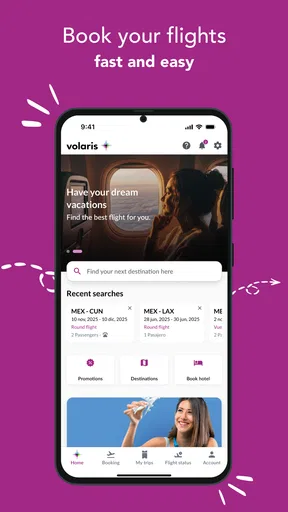
Upon downloading the Volaris app, the first thing you notice is the clean and user-friendly interface. It's like stepping into a well-organized airport lounge rather than a chaotic terminal. The app is available on both Android and iOS, so it’s ready to go for pretty much everyone.
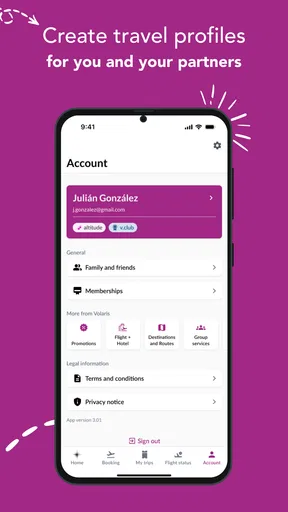
Signing in is a breeze, thanks to options like fingerprint recognition and Facebook login. It’s these little conveniences that really make the app stand out because let's face it, no one remembers their password these days!
Booking Made Easy
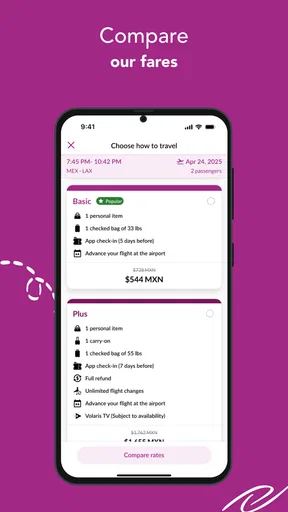
One of the app’s standout features is how easy it makes booking flights. You can search for flights just like on their website, but the app is definitely quicker. You tap in your travel details, and bam, you’re browsing flights. It’s almost like magic. I found the process incredibly intuitive—a few taps and swipes, and your next adventure is booked.
Not to mention, the app offers exclusive deals you won’t find elsewhere. So, if you’re a bargain hunter like me, it’s definitely worth checking out. There’s a nifty feature where you can save your favorite flights and get alerts about price changes. Talk about a lifesaver!
Managing Your Trip
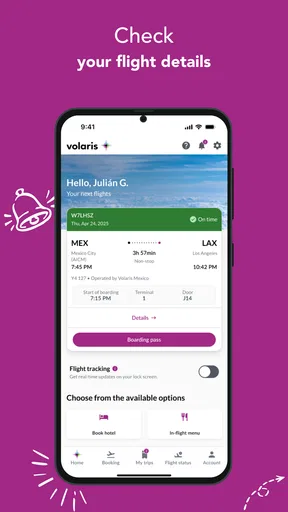
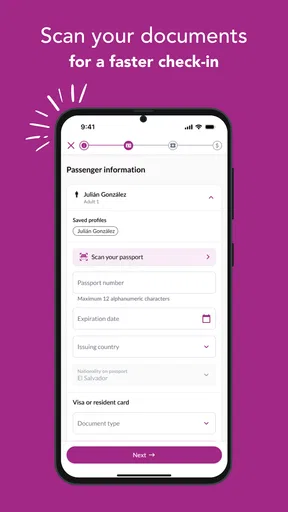
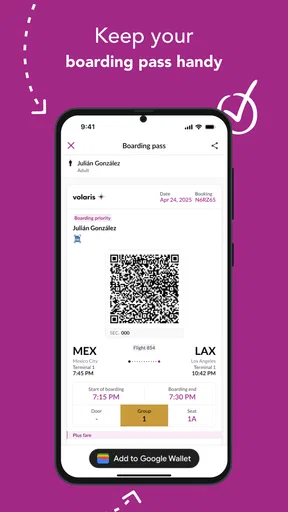
The app isn’t just about booking flights; it’s also your go-to tool for managing your travel itinerary. You can check-in online, select your seat, and even download your boarding pass directly to your phone. This means no more digging through emails or worrying about losing a paper ticket.
One of the coolest features is the ability to track your flight in real-time. It’s perfect for those of us who like to keep a close eye on everything. Plus, the app sends you notifications if there are any changes to your flight schedule. It’s like having a personal assistant who cares about your travel plans.
Extra Features Worth Mentioning
Aside from the basics, the Volaris app surprises with additional features that enhance the travel experience. You can add extras to your booking, such as baggage and in-flight meals, without having to navigate away from the app. It’s all about convenience and flexibility.
Another neat addition is the travel guide section. It's packed with tips and recommendations for destinations where Volaris flies. If you’re the spontaneous type who decides travel plans on the fly, this section is a treasure trove of ideas.
End of the Flight
As I wrapped up my test run with the app, I couldn’t help but feel a sense of satisfaction. The Volaris app is like a trusty co-pilot that makes the journey smoother and more enjoyable. From booking to arrival, it streamlines every part of the travel process, leaving you more time to look forward to your trip rather than stress about the logistics.
In a world where travel can often feel overwhelming, having an app like this in your toolkit is invaluable. Whether you're a frequent flyer or just planning a vacation, the Volaris app is definitely worth a download. It’s efficient, easy to use, and packed with features that cater to all your travel needs. So go ahead, give it a spin, and start planning your next getaway with a little more peace of mind.
A practical routine from booking to boarding
For a realistic use case, imagine booking a weekend flight during a lunch break, then traveling several weeks later. I would first compare the route and timing outside the airline app if I were still weighing carriers. Once I had settled on Volaris, I would use the app to book, then return to the trip area when I was ready to check in, choose a seat or add baggage. Keeping those actions tied to the same reservation is more orderly than searching through old messages for every step.
A useful, easy-to-miss trade-off is that convenience can encourage rushed decisions. When an app makes add-ons available alongside a booking, I would pause to check whether each one matches the actual trip: a short visit with only a small bag has different needs from a longer stay. Reviewing the itinerary and extras before confirming helps keep the process deliberate rather than letting a quick tap decide what I take or pay for.
For a travel day, I would open the app while I still have reliable internet, check the trip details and make sure I can reach the boarding pass. I would also keep the confirmation email available as a backup. That is not needless duplication: it gives me another way to find the reservation if I have a weak connection, a drained battery or a sign-in snag at an inconvenient moment.
Where it fits among travel tools
Compared with a general travel-booking app, an airline app has a narrower job. A broad service is often better for surveying multiple carriers, routes and travel components in one search. Volaris’s app makes more sense after I have chosen the airline, when I want to work with that booking and its related travel steps. For a traveler who flies different airlines, the best setup may be a comparison tool for planning and airline apps only for trips that need them.
There is also a reasonable no-install option: use a browser and keep the reservation email handy. That can be enough for an occasional traveler who does not want another account or app on their phone. The app becomes more appealing when I expect to revisit the trip, handle check-in or seat selection, or keep flight updates close at hand. The choice is less about which approach is universally superior and more about whether those recurring tasks justify an app for this particular journey.
Small checks that reduce travel-day friction
I would avoid waiting until the airport to discover that I cannot sign in. Checking access ahead of time is especially useful if I used a social login or a device-based sign-in option, because the account method that felt convenient when booking may not be the one I instinctively remember later. If another person is traveling with me, I would also agree in advance who is keeping the booking details available, rather than assuming both phones have the same information.
Notifications can be helpful, but I would not make them my only source of truth. A phone may silence alerts, lose connectivity or simply be put away, so I would check the itinerary directly when plans matter. Likewise, a flight tracker can help me follow changes, but it does not replace checking the trip details before leaving for the airport. These habits keep useful tools in their proper role: they reduce uncertainty without making the traveler passive.
For a family booking or a trip coordinated among friends, the person managing the reservation should think about how others will get the information they need. Sharing only relevant details is more sensible than forwarding every screen or exposing account access. The same applies when asking someone for help: provide the booking information they need for that task, not broad access to the account.
A cautious recommendation
My overall view is positive for the right traveler, with a clear boundary: this is most useful when Volaris is the airline you are flying and you want airline-specific tasks close at hand. Booking, check-in, a mobile boarding pass, flight updates and optional trip extras form a practical set of jobs for one app. A destination guide can also help when I want ideas after choosing where to go, although it is not a substitute for comparing the whole market or planning every part of a complex itinerary.
I would skip it if I rarely use Volaris, prefer to keep airline tasks in a browser, or need one central place for several carriers. I would also avoid relying on any single phone-based route for essential travel information. Before installing, I would check the app’s current permissions and the account choices shown on my device, then decide whether those choices feel appropriate for my needs; I would not infer privacy practices from convenience features alone.
Released on March 7, 2025, and offered free, the app is a straightforward option to consider if its focused role matches your travel habits. Its 3.8 average is a reminder to keep expectations practical: the rating is a broad summary, not a guarantee that every booking or airport experience will be smooth. I would use it as a convenient companion to a Volaris reservation, keep a backup of important trip information, and choose another tool when comparison across airlines matters more than managing one carrier’s journey.
Pros
- Intuitive user interface for easy navigation.
- Real-time flight status updates.
- Multiple payment options available.
- Personalized travel recommendations.
- Seamless booking and check-in process.
Cons
- Limited customer service response time.
- Requires internet connection for most features.
- Occasional app crashes reported.
- Frequent pop-up ads can be intrusive.
- Some features locked behind premium access.
FAQs for Volaris
What is Volaris and what features does it offer?
Volaris is a mobile app designed for booking and managing flights with Volaris Airlines. It provides features such as flight booking, check-in, flight status updates, and boarding pass management. Users can also access exclusive deals, manage their travel itineraries, and receive real-time notifications about their flights.
Is the Volaris app available for both Android and iOS devices?
Yes, the Volaris app is available for both Android and iOS devices. You can download it from the Google Play Store for Android devices and the Apple App Store for iOS devices. Ensure your device is running a compatible operating system version for the best experience.
How can I book a flight using the Volaris app?
To book a flight using the Volaris app, open the app and select the 'Book a Flight' option. Enter your travel details, including departure and destination cities, travel dates, and the number of passengers. The app will display available flights and fares. Select your preferred flight and follow the prompts to complete your booking.
Does the Volaris app support multiple languages?
Yes, the Volaris app supports multiple languages, catering to a diverse user base. You can typically select your preferred language in the app settings. This feature ensures that users can navigate the app and access information in a language they are comfortable with, enhancing the overall user experience.
Can I manage my bookings and check my flight status through the Volaris app?
Absolutely, the Volaris app allows users to manage their bookings and check flight statuses easily. You can view your itinerary, make changes to your booking, and receive real-time updates on flight schedules. This ensures you are always informed and can manage your travel plans efficiently.


